ZIP Code Manager
WordPress/WooCommerce plugin that batch-imports a postal-code nomenclature from Excel, normalizes counties, streets, and number ranges, and can manually fill in the billing and shipping postal codes of orders.
Core stack
The challenge
The challenge was turning an Excel postal nomenclature with cities, counties, and irregular expressions for street numbers into a queryable source from WooCommerce, then matching freely entered order addresses to the correct ranges without blocking WordPress during large imports.
The solution
The solution uses a WordPress plugin with a dedicated MySQL table and PhpSpreadsheet with read filters. The import has a preview and AJAX chunk processing, the parser separates the county and normalizes number ranges, and the WooCommerce integration parses and normalizes addresses before an exact, fuzzy, and fallback lookup. The operator can run the correction directly from an order's list or page, and the result is persisted through the WooCommerce object API.
Notable complexity
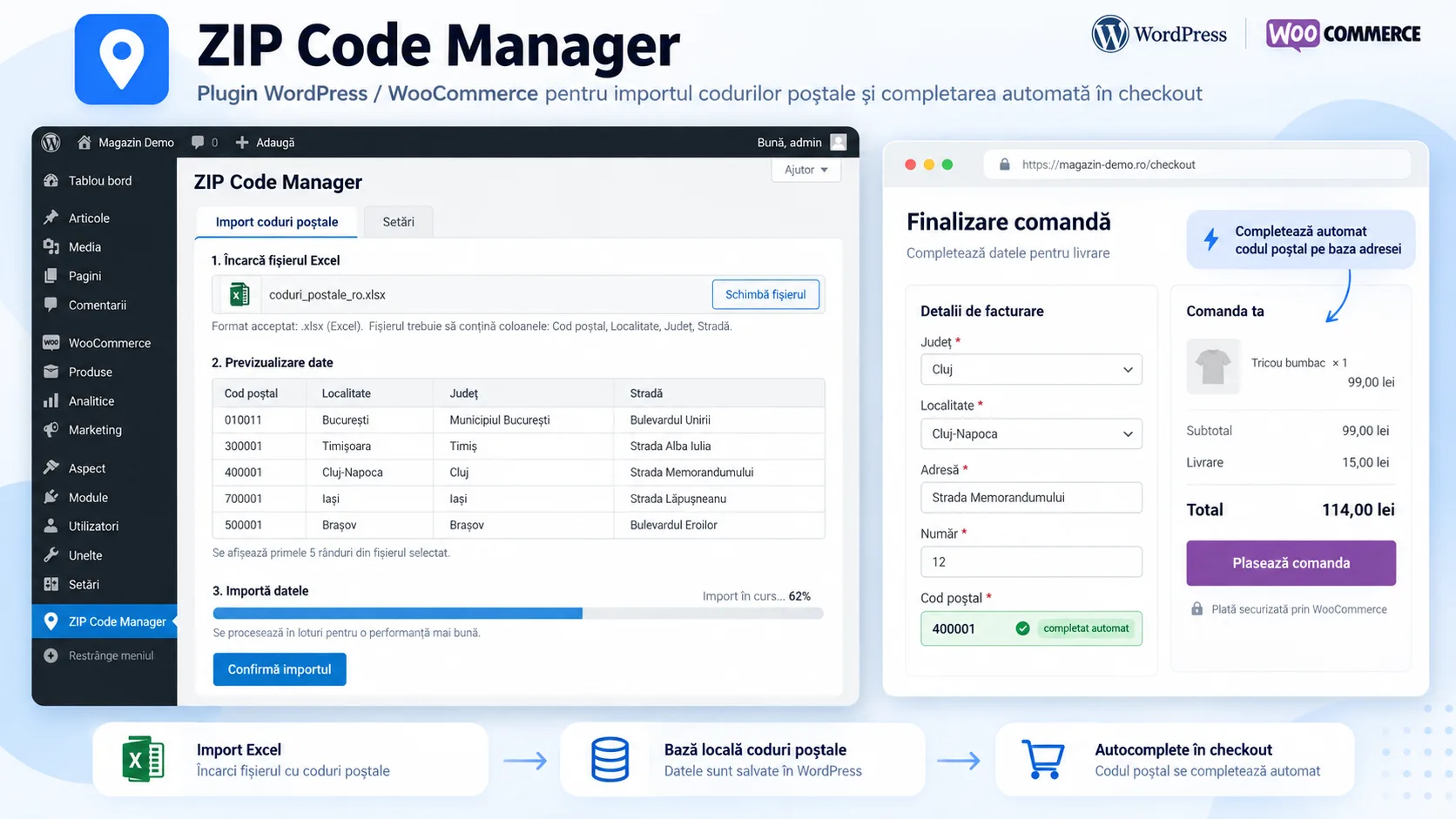
ZIP Code Manager is a WordPress plugin built for an operational WooCommerce flow where order postal codes need to be verified or completed based on a local nomenclature. The administrator uploads an Excel file from WordPress Admin, sees a preview of the first rows, and confirms the import; processing continues through successive AJAX requests, so a large file is not treated as a single long-running web request.
The import uses PhpSpreadsheet and an IReadFilter that reads only the required columns from the source: postal code, city, and street. The AJAX flow processes 500 rows at a time, and the UI receives, for each chunk, the number of entries processed, inserted, updated, and already existing. For the preview, up to 50 rows are read. The snapshot allows selecting both .xls and .xlsx, but the chunk processor explicitly uses the Xlsx reader; legacy XLS support should therefore be considered incomplete.
Before persistence, the city is separated from the county abbreviation through a complete map of Romania's counties, with separate handling for Bucharest and its sectors. The street is then parsed for segments such as nr., ranges like 13-17, open ends of the form 26-T, single numbers, and bis/A/B-style suffixes. When a street contains several ranges, each range becomes a usable row for lookup, and the full structure can be kept as JSON in multiple_ranges.
Data is saved into a dedicated WordPress table, wp_*_zip_codes, with postal code, city, county, street, range start and end, an infinite-range flag, metadata for multiple ranges, and created_at. The schema has a composite index on postal code + street and an index on the range endpoints. The import tries to identify an existing record through the combination of postal code, street, number_start, and number_stop; new entries are grouped into a single INSERT, and existing ones receive an update for city, county, and range metadata. However, there is no UNIQUE constraint in the DB, so integrity against duplicates relies on application logic.
The WooCommerce integration is operator-oriented. The «Update postal code» action appears in the order list and in the edit screen. When pressed, the plugin separately reads the billing and shipping addresses, normalizes diacritics and county abbreviations, extracts the street number, sector, and building block, and tries to find a postal code in the imported table. The search has three tiers: matching on city/county + street and numeric range, then a looser LIKE on the street, then a fallback to the first distinct code for city/county. If it finds results, it updates billing_postcode and, where applicable, shipping_postcode through the WooCommerce Order object and saves the order.
The plugin declares WooCommerce HPOS compatibility and checks for the presence of WooCommerce and PhpSpreadsheet before use. The import AJAX and the order-update action use a WordPress nonce. However, the snapshot has a few hardening points: the initial upload form has no nonce of its own, the AJAX handlers do not perform an explicit current_user_can check, the temporary import file is not deleted at the end, the upload MIME type is checked directly from the request, and debug logging writes addresses and queries to error_log. These are code observations, not features presented as advantages.
The project's frontend is intentionally native WordPress Admin, not a separate application. Upload and preview use WordPress's visual components, and jQuery drives chunk processing and progress messages. There is a CSS file for the postal-code update button, but the snapshot does not register it via wp_enqueue_style; import progress is mainly textual, with no design system of its own. The repository contains a single portfolio backup commit and includes no tests, GitHub workflows, Docker, or deployment scripts.
Key results
- WordPress/WooCommerce plugin dedicated to importing and looking up Romanian postal codes
- Excel import with preview before confirmation and AJAX processing in chunks of 500 rows
- PhpSpreadsheet-filtered reading limited to the relevant nomenclature columns
- Mapping of county abbreviations with separate handling for Bucharest and its sectors
- Street parser with ranges, an open end (-T), single numbers, and bis/letter suffixes
- Persistence into a dedicated WordPress table with indexes for code/street and numeric range
- Application-level detection of existing records before insert and updating of the corresponding metadata
- WooCommerce action to fill in the postal code directly from the order list
- Equivalent AJAX action in the order-edit screen
- Separate updating of billing and shipping postal codes when the addresses differ
- Three-tier lookup: exact match on street and range, fuzzy search on street, and fallback on city
- WooCommerce HPOS compatibility declared in the plugin
Related projects
- Farmadati ImportWordPress module that pulls Farmadati datasets via SOAP, normalizes the XML schema, and enriches WooCommerce products with prices, descriptions, manufacturer, pharmaceutical metadata, and images.
- Feed2WooAIWordPress plugin for batch-importing products from JSON feeds into WooCommerce, updating by SKU, images, and categories, OpenAI rewriting, admin progress tracking, and automation through REST endpoints and cron scripts.
- Page Content ExtractorOperational WordPress tool for finding and bulk-updating localized pages, with Elementor/Gutenberg/Classic support, AI rewriting via Gemini, and image generation via Vertex AI Imagen.
Want something similar?
Start with the estimate wizard — answer a few questions and get a realistic price range and timeline.