Feed2WooAI
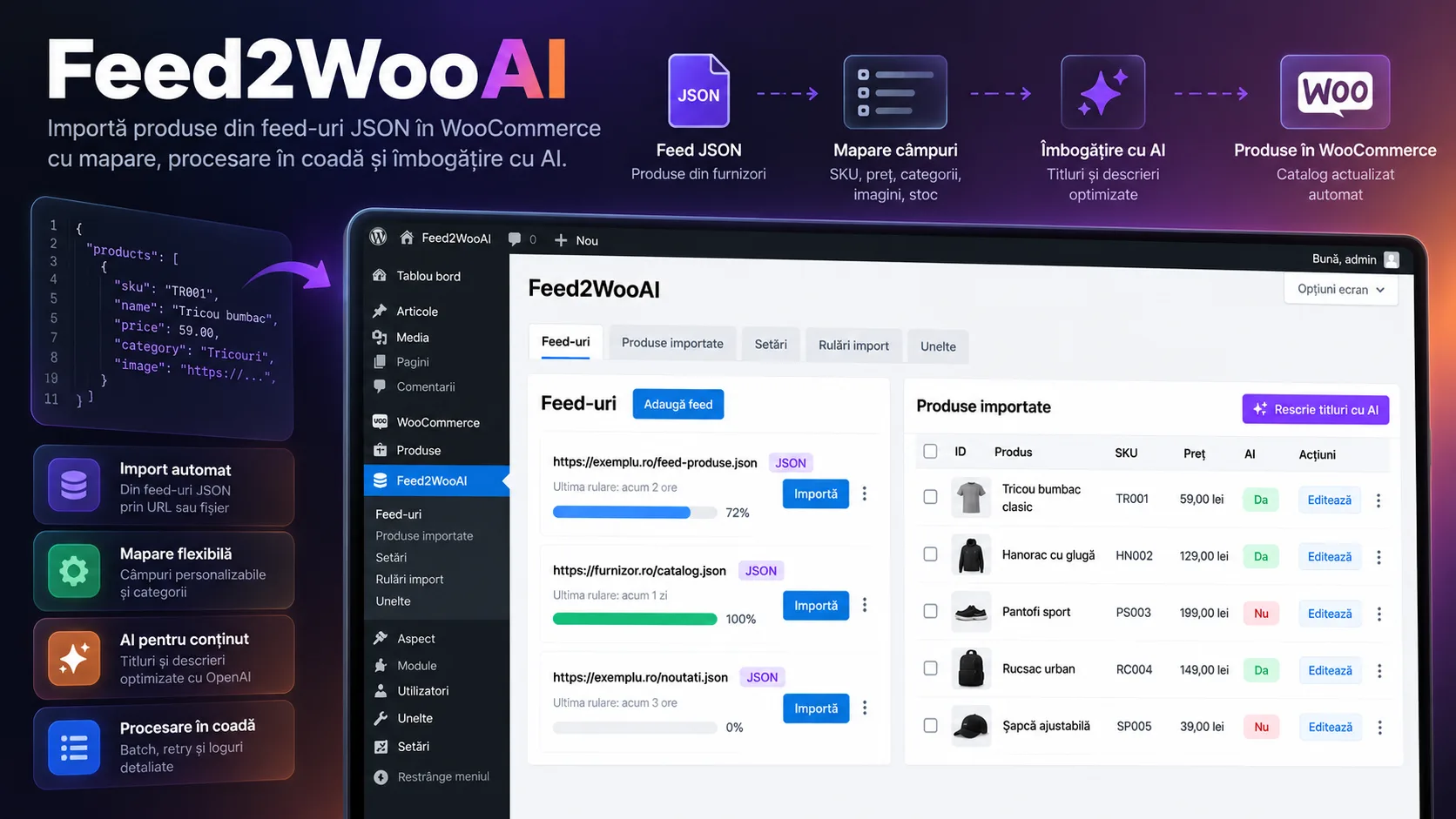
WordPress plugin for batch-importing products from JSON feeds into WooCommerce, updating by SKU, images, and categories, OpenAI rewriting, admin progress tracking, and automation through REST endpoints and cron scripts.
Core stack
The challenge
The challenge was repeatably synchronizing an external catalog with WooCommerce without creating duplicates, keeping stock, prices, images, categories, and metadata consistent, then adding an AI rewriting stage that could run incrementally without turning a single web request into a long, fragile process.
The solution
The solution implements a WooCommerce plugin with SKU-based reconciliation, batch processing, and persistent state in the WordPress Options API. The admin interface starts imports and tracks progress via AJAX, the importer updates or creates simple products and attaches media/categories, and a separate OpenAI module rewrites the title and description of products flagged as not yet reviewed. REST endpoints and cron scripts enable server-side automation, and the built-in logger provides traceability for import, media, and AI calls.
Notable complexity
Feed2WooAI is a WordPress plugin built for managing a WooCommerce catalog fed by external feeds. The main surface is a WordPress Admin panel where the administrator can add or remove feed URLs, start an import for a feed, track progress, search imported products by ID or SKU, and see whether a product has already been rewritten with AI. Separate pages exist for OpenAI configuration and for reviewing operational logs.
The current importer consumes JSON feeds and processes the catalog in batches. For each valid entry, the SKU is the reconciliation key with WooCommerce: an existing SKU is updated instead of being duplicated, while a new SKU creates a published WC_Product_Simple. The suggested price, stock, stock status, category, main image, gallery, and extra feed fields are synchronized, with the latter persisted as meta data under a dedicated prefix. WooCommerce categories are created as needed, and the category image can be pulled from the provider's storage when the feed includes an imageId.
Processing is controlled through queues persisted in the WordPress Options API. The import queue keeps track of the current feed, offset, number of new products, total, and completion state, and the AJAX interface successively requests one batch at a time and updates the progress bar. The import also uses a lock transient to avoid two simultaneous batches. This mechanism is not a distributed queue and has notable limitations: entries without a SKU do not advance the offset, a lock can remain active when the queue is missing, and automatic initialization from the REST endpoint reuses the AJAX handler that requires a nonce, which makes the REST cron dependent on an already-initialized queue or on fixing this flow.
AI rewriting is implemented separately through OpenAI Chat Completions. The administrator configures the key and the prompt template, and the product sends its title and current description to the model. The response is parsed in a Title/Description format, then the WooCommerce name and description are updated and the product receives the _f2wai_ai_rewritten meta flag. Rewriting can be triggered for all imported products that don't have the flag, or individually, directly from the table. The AI queue processes one product per iteration, but has no lock of its own, limited retry, or backoff; if a rewrite fails, the offset does not advance and the same product can block progress.
Images are downloaded through the WordPress Media APIs and attached to products. To reduce processing cost, the plugin disables intermediate thumbnail generation during sideloading and keeps a URL cache only within the current batch. The code renames downloaded files with a .webp extension without actually converting the format, so this area should be treated as an incomplete optimization rather than a real media-conversion pipeline.
Automation is prepared through two REST endpoints — import and AI rewrite — protected by a key saved in WordPress options, plus Bash and PowerShell script generators for running from cPanel or another external cron. The repository contains Bash scripts configured for a real site, which confirms practical use of the flow, but these include a REST key in plain text and must be regenerated with the secret rotated. The endpoints use the key in the query string and a public permission_callback, so security currently depends on that secret.
The plugin defines no tables of its own and uses native WordPress/WooCommerce structures: options for configuration and queues, post meta for imported flags and fields, the product_cat taxonomy for categories, and the Media Library for images. Interactive administration uses jQuery and the WordPress AJAX API with a nonce and manage_options checks for the main operations. There is no test suite, CI/CD, or GitHub workflows in the analyzed repository, and the available history is a single portfolio backup commit.
Key results
- WordPress/WooCommerce plugin dedicated to catalog import from JSON feeds
- Incremental batch import with progress visible in WordPress Admin
- SKU-based reconciliation for updating existing products without intentionally creating duplicates
- Creation of simple WooCommerce products with price, stock, stock status, images, and category
- Gallery and main image import through the WordPress Media API
- Automatic creation of WooCommerce categories and association of a category image when the feed provides an imageId
- Persistence of extra feed fields as meta data under a dedicated prefix
- Paginated list of imported products with search by ID or SKU and an indicator for AI rewrite status
- OpenAI rewriting for title and description, available individually or in batch
- Configurable OpenAI prompt from WordPress Admin
- Persisted queues for import and AI rewrite in the WordPress Options API
- Import lock via WordPress Transients to limit concurrent executions
- REST endpoints for running import and AI rewrite batches
- Generation of Bash and PowerShell scripts for integration with an external cron
- Operational log page for import, images, and AI processing
Related projects
- Farmadati ImportWordPress module that pulls Farmadati datasets via SOAP, normalizes the XML schema, and enriches WooCommerce products with prices, descriptions, manufacturer, pharmaceutical metadata, and images.
- Page Content ExtractorOperational WordPress tool for finding and bulk-updating localized pages, with Elementor/Gutenberg/Classic support, AI rewriting via Gemini, and image generation via Vertex AI Imagen.
- ZIP Code ManagerWordPress/WooCommerce plugin that batch-imports a postal-code nomenclature from Excel, normalizes counties, streets, and number ranges, and can manually fill in the billing and shipping postal codes of orders.
Want something similar?
Start with the estimate wizard — answer a few questions and get a realistic price range and timeline.