Farmadati Import
WordPress module that pulls Farmadati datasets via SOAP, normalizes the XML schema, and enriches WooCommerce products with prices, descriptions, manufacturer, pharmaceutical metadata, and images.
Core stack
The challenge
The main challenge was turning several Farmadati datasets with different schemas and keys into a single coherent WooCommerce product, without losing the relationships between product, manufacturer, descriptions, and media documents, and without unnecessarily loading entire auxiliary XML files into memory.
The solution
The solution queries the schema directly from Farmadati, translates the fields into a common internal vocabulary, and processes the XML files with XMLReader. Base products are indexed by code, then successively enriched from the company, description, and image datasets. Persistence uses the WooCommerce API for create/update, meta fields for Farmadati identifiers, the WordPress Media API for images, and a brand taxonomy for the manufacturer.
Notable complexity
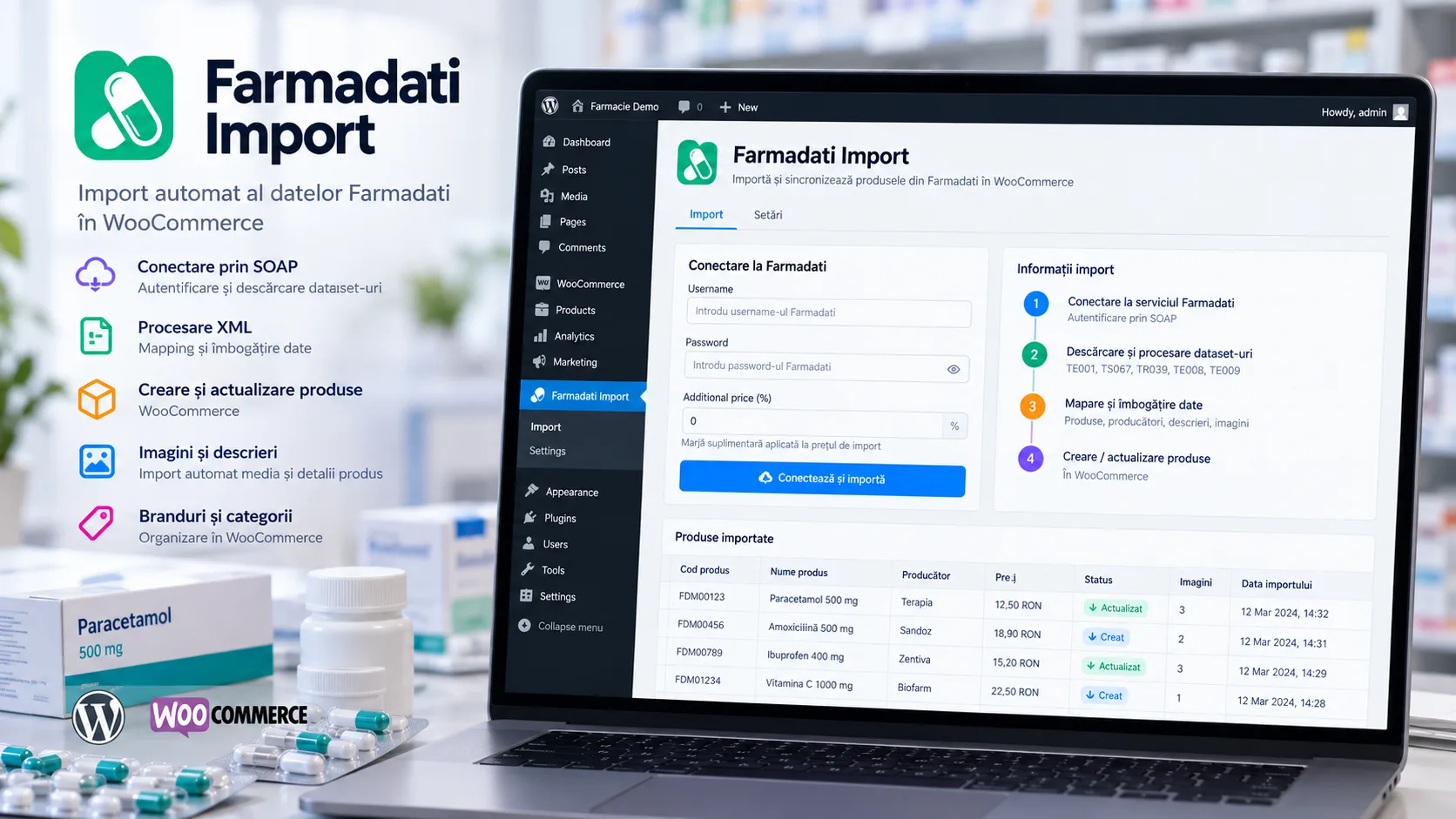
Farmadati Import is a WordPress administration module built to integrate a Farmadati catalog into a WooCommerce store. The interface is available to administrators through a dedicated wp-admin page and allows saving Farmadati credentials, applying a numeric markup to imported prices, and manually triggering synchronization.
The flow starts through the Farmadati SOAP service: the code requests the list of active datasets, downloads data with GetDataSet, and reads each dataset's schema with GetSchemaDataSet. The received files are saved as ZIP, extracted locally, and processed with XMLReader. The provider's schema is translated from Italian names into a stable internal model, so that data coming from different tables can be correlated by product or company codes.
TE001 supplies the base product, and the analyzed implementation explicitly limits this stage to the first 20 records. For these products, TS067 fills in the manufacturer used as Brand, TR039 adds the short description, TE008 adds the extended description, and TE009 attaches the image document names. Auxiliary tables are streamed and correlated through associative structures indexed by code, avoiding loading them entirely into intermediate collections.
Final persistence happens directly through the WooCommerce API. Existing products are looked up by the product_code meta field and updated, while new ones are created as WC_Product_Simple. The name, descriptions, prices, Farmadati codes, product type, ATC/GMP code, commercial flag, pricing dates, VAT, and manufacturer are saved. Images are downloaded from the Farmadati service through the WordPress Media API, the first image becomes the featured image, and the manufacturer is created or updated in a custom brand taxonomy and associated with the product.
The code also has a few important limitations in the analyzed snapshot. Extracted XML files are reused if they already exist locally, with no cache-invalidation rule, and the import runs synchronously within the admin request, with no queue, retry, locking, or background processing. Upsert on product_code reduces duplicates across sequential runs, but there is no unique constraint or protection for concurrent imports. POST actions do not use WordPress nonces, credentials are kept in options, the SOAP WSDL is configured over HTTP, and diagnostic responses can include the SOAP request on error. The delete button operates on the pharmaceutics CPT, while the import writes WooCommerce products, and a WP_Error returned by media_sideload_image is not counted correctly in the final summary because the object is truthy. The repository contains no tests, CI/CD, or the plugin's complete bootstrap, so these elements are not claimed as demonstrated deliverables.
Key results
- Dedicated Farmadati wp-admin page, available to accounts with the manage_options capability
- SOAP integration with the GetEnabledDataSet, GetDataSet, and GetSchemaDataSet operations
- Processing of the TE001, TS067, TR039, TE008, and TE009 datasets in a single import flow
- Dynamic mapping of XML keys to internal names based on the schema returned by Farmadati
- Streamed reading of XML files via XMLReader
- Correlating manufacturer, short description, extended description, and images with the base product
- Creating/updating WooCommerce products by looking up the product_code meta field
- Persisting pharmaceutical and commercial attributes as WooCommerce metadata
- Downloading Farmadati images into the Media Library and setting the first image as the featured image
- Creating or updating the brand taxonomy and associating the manufacturer with the product
- Configurable numeric markup applied to prices before persistence
- Admin completion message with the reported number of imported products and execution time
Related projects
- Feed2WooAIWordPress plugin for batch-importing products from JSON feeds into WooCommerce, updating by SKU, images, and categories, OpenAI rewriting, admin progress tracking, and automation through REST endpoints and cron scripts.
- Page Content ExtractorOperational WordPress tool for finding and bulk-updating localized pages, with Elementor/Gutenberg/Classic support, AI rewriting via Gemini, and image generation via Vertex AI Imagen.
- ZIP Code ManagerWordPress/WooCommerce plugin that batch-imports a postal-code nomenclature from Excel, normalizes counties, streets, and number ranges, and can manually fill in the billing and shipping postal codes of orders.
Want something similar?
Start with the estimate wizard — answer a few questions and get a realistic price range and timeline.