PDF Auto-Print
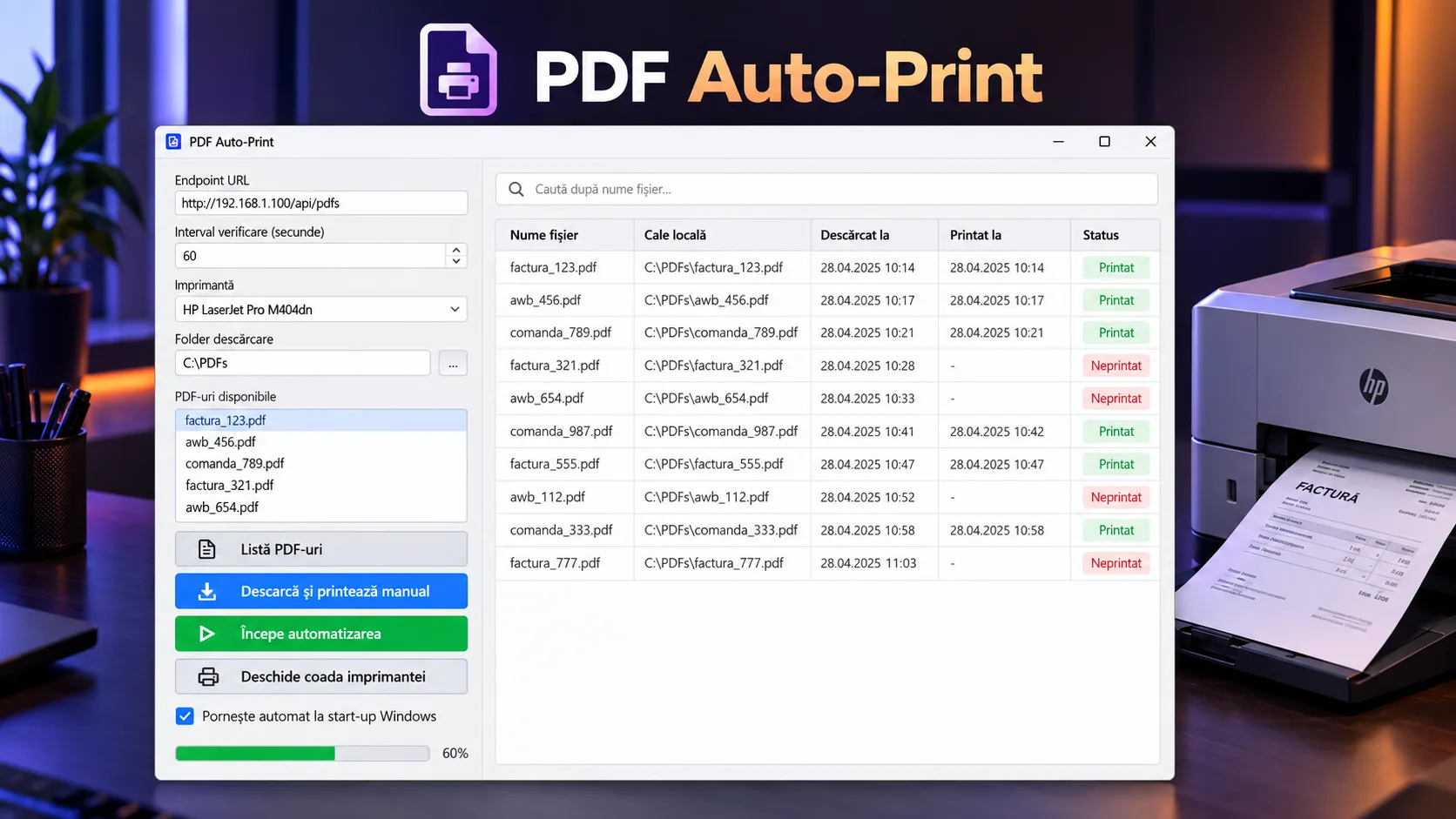
Python desktop utility that periodically polls an endpoint, downloads PDF documents, keeps a local history and status for them, and sends them automatically or manually to Windows printers via SumatraPDF.
Core stack
The challenge
The challenge was eliminating a repetitive operational step: detecting new documents, downloading them, avoiding unintended reprinting of the same URL, and sending them to a Windows printer, while retaining manual control and local traceability over the processed documents.
The solution
The solution combines a PyQt5 desktop UI with timer-based polling, Requests for HTTP integration, SQLite for a persistent document log, and pywin32 + SumatraPDF for Windows printer integration. A unique URL and the printed status separate new documents from already processed ones, and print failures remain in the unprinted state for a later retry. The UI allows manual intervention, selection, search, reprinting, deletion, and access to the printer queue.
Notable complexity
PDF Auto-Print is a desktop application for an operational workflow where PDF documents published by an endpoint must be picked up and printed on a Windows PC without repetitive manual checking. The PyQt5 interface centralizes the endpoint address, polling interval, selected printer, and local download folder, and these settings are persisted to a JSON file.
The automated flow starts a QTimer with a configurable interval between 10 and 3600 seconds. On each cycle, the application makes a POST request to the endpoint, treats the response as a JSON list of URLs, downloads the documents into the configured folder, and records each URL in SQLite. The local table keeps the unique URL, file path, download timestamp, print status, and print timestamp.
Printing is performed sequentially through SumatraPDF in command-line mode, using -print-to for the selected printer and the fit setting. The printer list is read from Windows via pywin32, including local and networked printers, and the application can open the system queue directly for the current printer.
Idempotency is partial and explicit at the state level: the URL has a UNIQUE constraint, insertion uses INSERT OR IGNORE, and only rows with printed=0 enter the automatic print flow. If printing fails, the row stays unprinted and will be retried on a later cycle. However, there is no separate job queue, backoff, retry limit, or attempt counter, and PDFs are re-downloaded before deduplication happens in the database.
Beyond automation, the UI offers a manual flow: listing documents available at the endpoint, downloading and printing them with visible progress, searching by file name, selecting rows, reprinting unprinted documents, manually changing status, copying from the table, and synchronized deletion of the local file and the SQLite record.
At startup, the application reconciles the local database with the disk and removes entries whose files no longer exist. Optionally, it can create or remove a shortcut in the Windows Startup folder so the utility launches with the user session. The repository also includes a PyInstaller spec for a windowed build, plus a minimal PHP endpoint used for testing the PDF listing.
The analyzed snapshot is functional as a local desktop utility, but it is not hardened as an enterprise agent. The endpoint configured in the repository uses HTTP, there is no authentication or response signing, requests do not set a timeout, the type and size of downloaded files are not validated, and page_size and orientation exist in the config without being applied to the print command. Also, two different URLs with the same file name can point to the same local path.
Key results
- Windows desktop application configurable with endpoint, polling interval, printer, and local folder
- Automated flow endpoint → PDF download → SQLite persistence → silent printing
- Local persistence for URL, path, download timestamp, print status, and print timestamp
- Deduplication of processed documents via unique URL and automatic selection of only unprinted rows
- Default retry of failed print jobs by keeping the printed=0 status
- Enumeration of local and networked Windows printers and opening the queue for the selected printer
- Manual flow for listing documents, downloading, printing, and progress tracking
- Tabular history with search, editable status, selection, and reprint or delete operations
- Reconciliation of the SQLite database with files existing on disk at startup
- Optional startup with Windows via a Startup folder shortcut
- PyInstaller configuration for distributing the application without a console window
Related projects
- Real Estate ScraperPython tool for collecting and normalizing Storia listings, with parallel scraping, deduplication by listing ID, relational storage, a filterable REST API, and walking, driving, and public-transit distance calculations.
- Time TrackerReact + Express application that centralizes imported time-tracking data, adds manual hours, applies reporting rules, and generates filters, charts, hour reports, and billing calculations for project groups.
- QR GeneratorSimple full-stack tool for app distribution through a single QR code: define the iOS/Android links, generate a QR code pointing to a stable address, and redirect the mobile user to the appropriate store.
Want something similar?
Start with the estimate wizard — answer a few questions and get a realistic price range and timeline.